
Included from Business
A CRM that knows what each person watched
One profile per person: videos watched, forms filled, orders made and lessons finished.
- 1 profile
- Watched, filled, bought, learned
- Live
- Segments that update themselves
- CSV
- Import and export any time
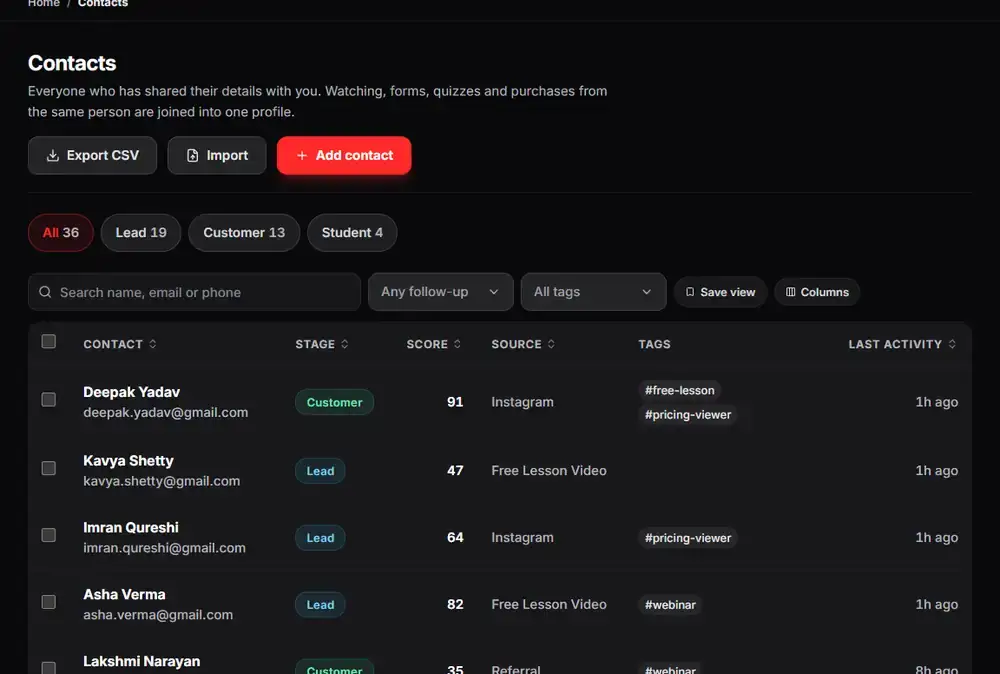
The real Arknox dashboard with sample data
Up and running in three steps
- 1
People arrive on their own
Leads from forms, buyers from checkout and students from courses become contacts automatically.
- 2
Organise
Move contacts through a pipeline, add tasks and custom fields, and save segments.
- 3
Act
Send an email to a segment or trigger an automation from the same screen.
Why a creator’s CRM should start from the video
A general CRM knows a name and an email. It does not know that this person watched 80% of your pricing video, filled in a form, bought a course and stopped halfway through module three.
In Arknox the video, the form, the order and the lesson all write to the same contact. When you open a profile you see the whole story, and when you build a segment you can use any of it: everyone who watched a video but did not buy, or everyone who bought but has gone quiet.
Pipelines, tasks and lead scores sit on top of that data, so follow-ups are based on what people actually did.
See it inside the dashboard
What you get
One profile
Views, answers, orders and lessons together.
Pipelines and tasks
Track a lead from first view to paying customer.
Custom fields and lead scores
Store what matters to you and rank who is ready to buy.
Segments that update themselves
Saved groups that stay current as people change.
Bulk actions and saved views
Tag, export or email many contacts at once.
Import and export
Bring in a CSV and take your data out any time.
Made for
- Creators who outgrew a spreadsheet
- Teams who want sales and teaching data in one place
- Anyone paying for a CRM and a separate course platform
Good to know
The CRM is part of the Business plan and above. The number of contacts you can store depends on your plan.
Questions people ask
Do I have to enter contacts by hand?
No. Leads, buyers and students are added automatically, and you can also import a CSV.
Can I take my data out?
Yes. You can export contacts and other data from the Data export page.
How many contacts can I store?
It depends on the plan, from 1,000 on Starter up to 100,000 on Academy / Scale.
Which plan includes the advanced CRM?
Business and above.
Try it on your own videos
Create an account, paste a YouTube link and see it working in a few minutes.